Homelab
Overview
This is an overview for my homelab, and vps setup along with documentation for services I host. My primary goal in late 2025 shifted to being independent from many services I used. It included having a place to watch media at, file and photo backups, matrix homeserver, email, a git frontend etc. I realize that I cannot switch away from everything immediately, and the cost to setup something like email would be very high, getting it through filters, blocklists and such. Therefore, I started with simple to setup services.
Before I could setup any services, I needed a machine that could act as my server. I needed stable internet access, storage and backup power to be reliable.
Infrastructure
For my homelab, the infrastructure includes—a laptop, two external HDDs, USB Drive Bay, two VPSes, 200Mbps home network link.
Hardware
Server Machine
A used Thinkpad T480 from 2018, relevant specifications:
- CPU: i5-8350U
- RAM: 16GB @2400MHz
- Storage: 512GB SSD
- GPU: Integrated Intel 620
- Ethernet: Intel Ethernet Connection I219-V (upto Gigabit speed)
- WLAN: Intel Dual Band Wireless-AC 8265, Wi-Fi 2x2 802.11ac + Bluetooth 4.1, M.2 card
- WWAN: Missing
Storage
- 512 GB SATA SSD
- WD Blue 1TB HDD
- WD Blue 2TB HDD
- Wav Link 12TB two disk drive bay (I access the HDDs via this)
Network
- 200 Mbps Up and Down wireless link (behind CG-NAT) [Primary]
- 4G Sim Card Dongle (USB) [Backup]
VPS
Out of security concerns, and also being forced by my ISP, I must proxy my services through a tunnel using a machine that’s exposed to the internet. That’s where VPS(s) come into play.
Bandwidth is not a large concern for me as I will access my services through my home network most of the time. But things like media consumption, and backup from the outside does require a decent bandwidth and a good amount of volume available. Luckily, Oracle grants us 10TB of outbound volume limits1 on Always Free Tier accounts.
While oracle is practically a privacy nightmare, this is the only thing I can afford for free. I take precautions to transfer everything encrypted using TLS, or the service I am exposing communicates with its own encryption. Nothing is physically stored on the VPSes and they just behave as public network machines meant to prevent direct access.
ARM VPS
This is the main VPS that I use to expose all my services. It has 3 Ampere A1 cores, 19GB RAM, 150GB storage.2 More than enough for my needs.
Software it runs:
- frp - Tunnel/Reverse proxy program, the main link between my home machine and VPS
- nginx - Reverse proxy that interacts with the frp tunneled services
- blocky-dns - DNS Proxy (kept independent from home server)
- matrix rtc calling3
x86 VPS
This is a secondary VPS, it has AMD based Compute VMs with 2 OCPU, 1 GB RAM, 50GB Storage2.
Currently, it is used for:
- rdseed.in - The root domain for my services.
- uptime-kuma - Status page and health check for exposed services on the other VPS.
Architecture
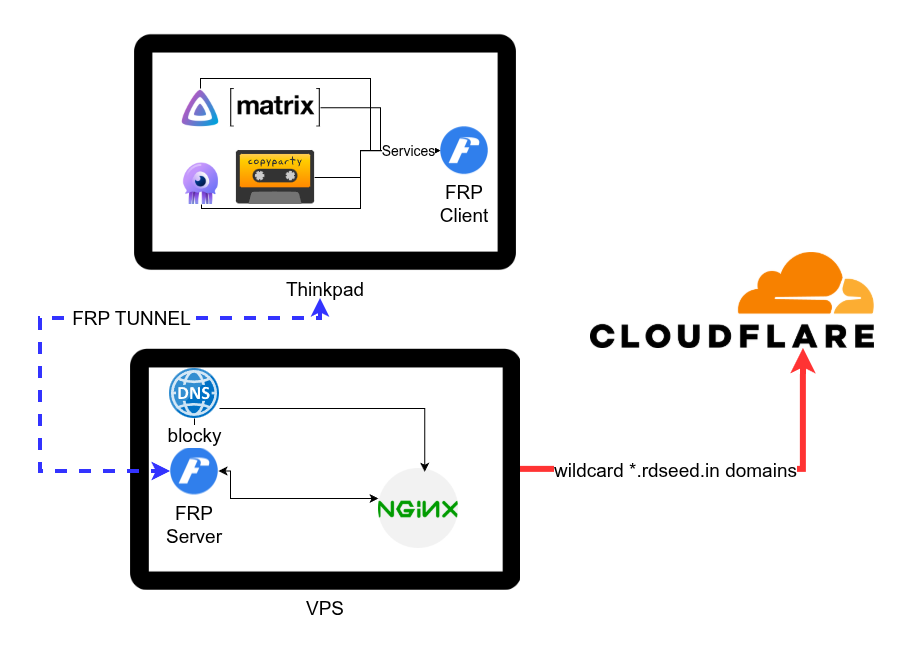
The diagram shows how everything is proxied from my homserver, through the VPS, to the internet.
FRP uses TLS encryption with self signed certificates so data doesn’t get snooped-on in the middle. nginx and fail2ban handle the public facing brunt and ban any malicious IPs for 365 days.
I manage my DNS Records through cloudflare, and have a wildcard pointing to my main arm server.
This is a rough outline of how things work in a larger manner.
Services
While I planned for many services as stated in #overview. I only wish to state the ones I’ve setup, are working, and are exposed to the internet.
- Tuwunel - Matrix Homeserver
- Jellyfin - Media Server System
- Jellyseerr - Media Requests Manager
- Copyparty - File Server
- Blocky DNS - DNS Proxy
The following parts in the #services section just contain some documentation and issues I faced.
Matrix Homeserver
I decided on using Tuwunel as my homeserver, with its active development and Rust base. A friend had been using it for a while and reported positive results as well, so it made sense to use this.
Overall, this is very easy to setup and proxy. Since I am hosting it on my local machine, I didn’t
want to federate over port 8448 and instead opted for delegating to port 443. Delegation also
allowed me not to take up a subdomain as the server_name parameter.
I also setup Matrix RTC calling and Legacy Calling as stated before, but during setup I realized I
was facing hiccups on Element. It was rejecting my .well-known/matrix/client delegation file. I
could not resolve rdseed.in as a homserver URL.
I couldn’t place calls as well even if I force logged in using matrix.rdseed.in
as homserver. In hindsight, it should’ve been obvious that there was an issue with delegation
since I wasn’t resolving my main domain as a homserver.
Upon inspecting the Network Tab in the Developer Console, I realized Element was rejecting my client file due to a CORS header issue. It was an easy fix in the nginx configuration on my #x86 VPS. All I needed to do was:
location = /.well-known/matrix/client {
    default_type application/json;
    alias /var/www/well-known/matrix-client.json;

+    add_header Access-Control-Allow-Origin "*" always;
+    add_header Access-Control-Allow-Methods "GET, OPTIONS" always;
+    add_header Access-Control-Allow-Headers "*" always;

    if ($request_method = OPTIONS) {
        return 204;
    }
}

location = /.well-known/matrix/server {
    default_type application/json;
    alias /var/www/well-known/matrix-server.json;

+    add_header Access-Control-Allow-Origin "*" always;
+    add_header Access-Control-Allow-Methods "GET, OPTIONS" always;
+    add_header Access-Control-Allow-Headers "*" always;

    if ($request_method = OPTIONS) {
        return 204;
    }
}
in the nginx configuration that served the rdseed.in domain name.
I don’t use element as my matrix client therefore, didn’t even realize I was having this issue. It was only during RTC testing I discovered this.
Blocky DNS
dns.rdseed.in - Provides DoT and DoH
I run this DNS Proxy on my VPS with Domain:IP mappings for local devices. You may think this is extremely counter-intuitive, and you would be correct. My ISP has put me behind a CG-NAT and a locked down router. I can’t even change my network-wide DNS, or have local network entries on the router because I change my DNS resolver per device due to the former issue. And the fact that I can’t even add DNS entries on the router in the first place, I’m pretty much reliant on that.
Now I could host this on my local machine and add relevant port mappings, but it would be too much of layering and latency that I gave up on the idea. If I get a better VPS, I might consider hosting the proxy locally instead. Until then, I’ll keep this on the VPS.
Jellyfin and Jellyseerr
These don’t need any introduction nor much documentation here. They work well, have had zero issues in terms of serving them both over the internet. I occasionally get weird library search issues on Jellyfin and random 500 Internal Server Error on Jellyseerr, but they are in an acceptable range that I don’t care much about them.
Copyparty
This is a very interesting, feature rich, and useful fileserver. It has been very handy with quick sharing of files and data on my devices, along with backups. It was a little tricky to setup initially for me because the program kept banning my IP due to wrong X Header configuration. This was actually documented in the README, so it never became an issue later after correction.
Home Layout
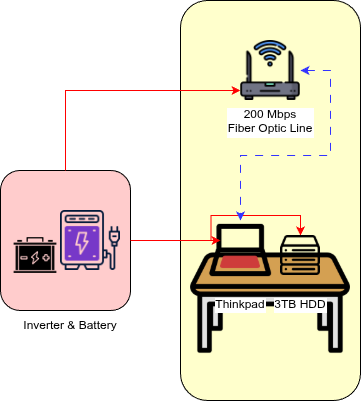
This is just a basic layout of my in-home setup, the battery backup provides continuous supply to keep everything running in case Mains/Grid power goes away. The thinkpad also has it’s own internal 24Whr and external 48Whr batteries attached.
That last resort along with the 4g sim card dongle should provide uptime for Matrix completely. Jellyfin relies on the external storage to serve media, which in the case of a complete power failure would lose access. I plan on fixing this with its own dedicated supply but it is not very hopeful yet.
Future Plans
Storage
My home server currently only has 3.5TB storage. While this is more than enough for my current needs, considering future needs I’m hoping I could atleast go up-to atleast 8 TB on the minimum end.
VPS
Oracle is a terrible VPS provider in terms of privacy, especially with its links to Israel and the CIA. Currently, only encrypted data passes through the VPS. Any VPS provider can still dump RAM and inspect the VPS as they like. I plan on improving how services interface with each other on the VPS.
Power
My thinkpad, disks, and router are currently backed with an Inverter and Battery. But the battery, serves my entire house and not just my hardware. I plan adding dedicated battery backup, either using an expensive UPS or buying a small battery and re-purposing an old inverter.
Internet
The thinkpad just connects to my router via a dedicated 5GHz SSID and serves things. I also have a 4G Sim Card USB Dongle connected the laptop, to serve as backup internet. The sim card network has limited bandwidth and volume compared to my fiber optic connection, but it serves as a last resort. I’m hoping I can write a script that seamlessly switches between the two networks. Currently, I just rely on NetworkManager automatically detecting and switching the network.
https://docs.oracle.com/en-us/iaas/Content/FreeTier/freetier_topic-Always_Free_Resources.htm#freetier_topic_Always_Free_Resources_Outbound_Data_Transfer ↩︎
Setup with livekit, jwt and coturn as external TURN server, see: tuwunel matrix RTC and tuwunel TURN guide ↩︎
お茶飲みたい〜
Amrit Handa | resume | rss feed | source