Fixing OpenMW on the RG34XXSP
Background
The Anbernic RG34XXSP is a tiny GBA-esque retro emulation handheld that’s surprisingly capable of playing a lot of PC Ports of games using Portmaster thanks to its 2GB RAM. While Anbernic doesn’t officially support Portmaster, a fork OS for it called StockOS Mod is bundling a fork of portmaster for stockos mod with amazing compatibility for games.
I recently got Stardew Valley running on it flawlessly, and I wanted to play Morrowind using the OpenMW engine which is also supported by portmaster!.
Identifying the Issue
I followed the instructions as said but the game refused to launch. It would just crash with no on-screen visuals.
Luckily, we get a log.txt in the directory as specified on the game’s portmaster page.
View log.txt
/mnt/sdcard/Roms/PORTS/Morrowind.sh: line 264: curl: command not found
/mnt/sdcard/Roms/PORTS/Morrowind.sh: line 265: curl: command not found
--- Checking system Python version ---
System Python is version 3.10.12. No custom environment needed.
mknod: /dev/dri/card0: File exists
LIBGL: Initialising gl4es
LIBGL: v1.1.7 built on Jul 16 2025 15:33:22
LIBGL: Using GLES 2.0 backend
LIBGL: Recompressing textures is disabled
LIBGL: loaded: libGLESv2.so
LIBGL: loaded: libEGL.so
LIBGL: loaded: libgbm.so
LIBGL: loaded: libdrm.so.2
LIBGL: Using GLES 2.0 backend
LIBGL: Hardware Full NPOT detected and used
LIBGL: Extension GL_EXT_blend_minmax  detected and used
LIBGL: FBO are in core, and so used
LIBGL: PointSprite are in core, and so used
LIBGL: CubeMap are in core, and so used
LIBGL: BlendColor is in core, and so used
LIBGL: Blend Subtract is in core, and so used
LIBGL: Blend Function and Equation Separation is in core, and so used
LIBGL: Texture Mirrored Repeat is in core, and so used
LIBGL: Extension GL_OES_mapbuffer  detected
LIBGL: Extension GL_OES_element_index_uint  detected and used
LIBGL: Extension GL_OES_packed_depth_stencil  detected and used
LIBGL: Extension GL_OES_depth24  detected and used
LIBGL: Extension GL_OES_rgb8_rgba8  detected and used
LIBGL: Extension GL_EXT_texture_format_BGRA8888  detected and used
LIBGL: Extension GL_OES_depth_texture  detected and used
LIBGL: Extension GL_OES_texture_stencil8  detected and used
LIBGL: Extension GL_EXT_texture_rg  detected and used
LIBGL: Extension GL_EXT_color_buffer_float  detected and used
LIBGL: Extension GL_EXT_color_buffer_half_float  detected and used
LIBGL: high precision float in fragment shader available and used
LIBGL: Max vertex attrib: 16
LIBGL: Extension GL_OES_standard_derivatives  detected and used
LIBGL: Extension GL_ARM_shader_framebuffer_fetch detected and used
LIBGL: Extension GL_OES_get_program_binary  detected and used
LIBGL: Number of supported Program Binary Format: 1
LIBGL: Max texture size: 8192
LIBGL: Max Varying Vector: 15
LIBGL: Texture Units: 16/16 (hardware: 16), Max lights: 8, Max planes: 6
LIBGL: Max Color Attachments: 1 / Draw buffers: 1
LIBGL: Hardware vendor is ARM
LIBGL: sRGB surface supported
LIBGL: EGLImage to Texture2D supported
LIBGL: EGLImage to RenderBuffer supported
LIBGL: Targeting OpenGL 2.1
LIBGL: Not trying to batch small subsequent glDrawXXXX
LIBGL: Trying to use VBO
LIBGL: glXMakeCurrent FBO workaround enabled
LIBGL: FBO workaround for using binded texture enabled
LIBGL: Force texture for Attachment color0 on FBO
LIBGL: Hack to trigger a SwapBuffers when a Full Framebuffer Blit on default FBO is done
LIBGL: glX Will try to recycle EGL Surface
LIBGL: Current folder is:/mnt/sdcard/Roms/PORTS/openmw
[INFO ] Desktop resolution: 720x480
[INFO ] Logical resolution: 720x480
[INFO ] ModEngine: Initializing...
[INFO ] Scanning for scripts in /mnt/sdcard/Roms/PORTS/openmw/esmm/utils/
[INFO ] Found a total of 4 scripts.
[INFO ] No active data sorter set. Defaulting to: bb_data_sort.txt
[INFO ] No active content sorter set. Defaulting to: plox_content_sort.txt
[INFO ] Performing initial sort of core game files...
[INFO ] ModEngine: Initialization complete.
openmw_esmm: symbol lookup error: openmw_esmm: undefined symbol: SDL_RenderGeometryRaw
/roms/ports/PortMaster/funcs.txt: line 140:  3647 Killed                  $GPTOKEYB "openmw_esmm"
/roms/ports/PortMaster/funcs.txt: line 140:  3664 Killed                  $ESUDO pkill -9 -f gptokeyb
/roms/ports/PortMaster/funcs.txt: line 140:  3666 Killed                  $ESUDO pkill -9 -f gptokeyb2
Here, these lines are of note:
/mnt/sdcard/Roms/PORTS/Morrowind.sh: line 264: curl: command not found
/mnt/sdcard/Roms/PORTS/Morrowind.sh: line 265: curl: command not found
...
openmw_esmm: symbol lookup error: openmw_esmm: undefined symbol: SDL_RenderGeometryRaw
curldoesn’t exist- a function name (symbol) isn’t found by the program loader in the SDL so
Problem-1: Missing Package
Solving (1) is rather easy, we can simply install a compatible version of curl for whatever linux distro lies underneath anbernic’s modos, which is just a skin for linux.
By SSH-ing into the device with root credentials (root@device, root), it just gives us the following MOTD
Welcome to Ubuntu 22.04 LTS (GNU/Linux 4.9.170 aarch64)

Last login: Mon Aug  3 16:32:16 2026 from 192.168.1.127
root@ANBERNIC:~#
We’re on Ubuntu 22.04 LTS running on a aarch64 CPU. We can simply grab the curl package from ubuntu ports and install it
$ wget -O curl.deb http://ports.ubuntu.com/ubuntu-ports/pool/main/c/curl/curl_7.81.0-1_arm64.deb
$ dpkg -i curl.deb
$ rm curl.deb # we clean up after outselves!
Problem-2: SDL2 Version Mismatch
For (2), if it can’t find the symbol, it’s usually because there’s a version mismatch, usually a newer
version of a library, or maybe an older, who knows.
We can find what SDL libraries we have on our anbernic install using find
$ find /usr/lib -name "*libSDL2*"
$ ls -al /usr/lib/libSDL2*
Output
/usr/lib/libSDL2-2.0.so.0.12.0
/usr/lib/libSDL2.a
/usr/lib/libSDL2_test.la
/usr/lib/aarch64-linux-gnu/libSDL2.a
/usr/lib/aarch64-linux-gnu/libSDL2_test.la
/usr/lib/aarch64-linux-gnu/libSDL2-2.0.so.0.2800.5
/usr/lib/aarch64-linux-gnu/libSDL2_image.a
/usr/lib/aarch64-linux-gnu/libSDL2_image-2.0.so.0
/usr/lib/aarch64-linux-gnu/libSDL2-2.0.so.0.18.2
/usr/lib/aarch64-linux-gnu/libSDL2_ttf-2.0.so.0
/usr/lib/aarch64-linux-gnu/libSDL2_ttf-2.0.so
/usr/lib/aarch64-linux-gnu/libSDL2.so
/usr/lib/aarch64-linux-gnu/libSDL2main.la
/usr/lib/aarch64-linux-gnu/libSDL2_net-2.0.so.0
/usr/lib/aarch64-linux-gnu/libSDL2_image-2.0.so.0.900.0
/usr/lib/aarch64-linux-gnu/libSDL2_image.so
/usr/lib/aarch64-linux-gnu/libSDL2.la
/usr/lib/aarch64-linux-gnu/libSDL2_ttf.so
/usr/lib/aarch64-linux-gnu/libSDL2_ttf-2.0.so.0.2300.0
/usr/lib/aarch64-linux-gnu/libSDL2_net-2.0.so.0.300.0
/usr/lib/aarch64-linux-gnu/libSDL2_mixer.la
/usr/lib/aarch64-linux-gnu/libSDL2-2.0.so.0
/usr/lib/aarch64-linux-gnu/libSDL2_image.la
/usr/lib/aarch64-linux-gnu/libSDL2_mixer.a
/usr/lib/aarch64-linux-gnu/libSDL2_net-2.0.so
/usr/lib/aarch64-linux-gnu/libSDL2_test.a
/usr/lib/aarch64-linux-gnu/libSDL2_mixer-2.0.so.0.800.0
/usr/lib/aarch64-linux-gnu/libSDL2_net.so
/usr/lib/aarch64-linux-gnu/libSDL2main.a
/usr/lib/aarch64-linux-gnu/libSDL2_mixer-2.0.so.0
/usr/lib/aarch64-linux-gnu/libSDL2_mixer.so
/usr/lib/libSDL2.so
/usr/lib/libSDL2main.la
/usr/lib/libSDL2.la
/usr/lib/libSDL2-2.0.so.0
/usr/lib/libSDL2_test.a
/usr/lib/libSDL2main.a
lrwxrwxrwx 1 root root      21 Aug  3 15:47 /usr/lib/libSDL2-2.0.so.0 -> libSDL2-2.0.so.0.12.0
-rwxr-xr-x 1 root root 4965488 Jun 12  2024 /usr/lib/libSDL2-2.0.so.0.12.0
-rw-r--r-- 1 root root 9306810 Jun 12  2024 /usr/lib/libSDL2.a
-rwxr-xr-x 1 root root     954 Jun 12  2024 /usr/lib/libSDL2.la
-rw-r--r-- 1 root root    3892 Jun 12  2024 /usr/lib/libSDL2main.a
-rwxr-xr-x 1 root root     871 Jun 12  2024 /usr/lib/libSDL2main.la
lrwxrwxrwx 1 root root      21 Aug  3 15:47 /usr/lib/libSDL2.so -> libSDL2-2.0.so.0.12.0
-rw-r--r-- 1 root root  721842 Jun 12  2024 /usr/lib/libSDL2_test.a
-rwxr-xr-x 1 root root     874 Jun 12  2024 /usr/lib/libSDL2_test.la
The current SDL2 in-use seems to be version 0.12.0, which is /usr/lib/libSDL2.-2.so.0.12.0 but there’s also a /usr/lib/aarch64-linux-gnu/libSDL2-2.0.so.0.2800.5. If we change the two symlinks to refer to the updated version, we should be able to fix our issue.
Let’s just backup the current two symlinks and create new ones pointing to the newer version.
$ cp -P /usr/lib/libSDL2.so /usr/lib/libSDL2.so.bak
$ cp -P /usr/lib/libSDL2-2.0.so.0 /usr/lib/libSDL2-2.0.so.0.bak
$ ln -sf /usr/lib/aarch64-linux-gnu/libSDL2-2.0.so.0.2800.5 /usr/lib/libSDL2.so
$ ln -sf /usr/lib/aarch64-linux-gnu/libSDL2-2.0.so.0.2800.5 /usr/lib/libSDL2-2.0.so.0
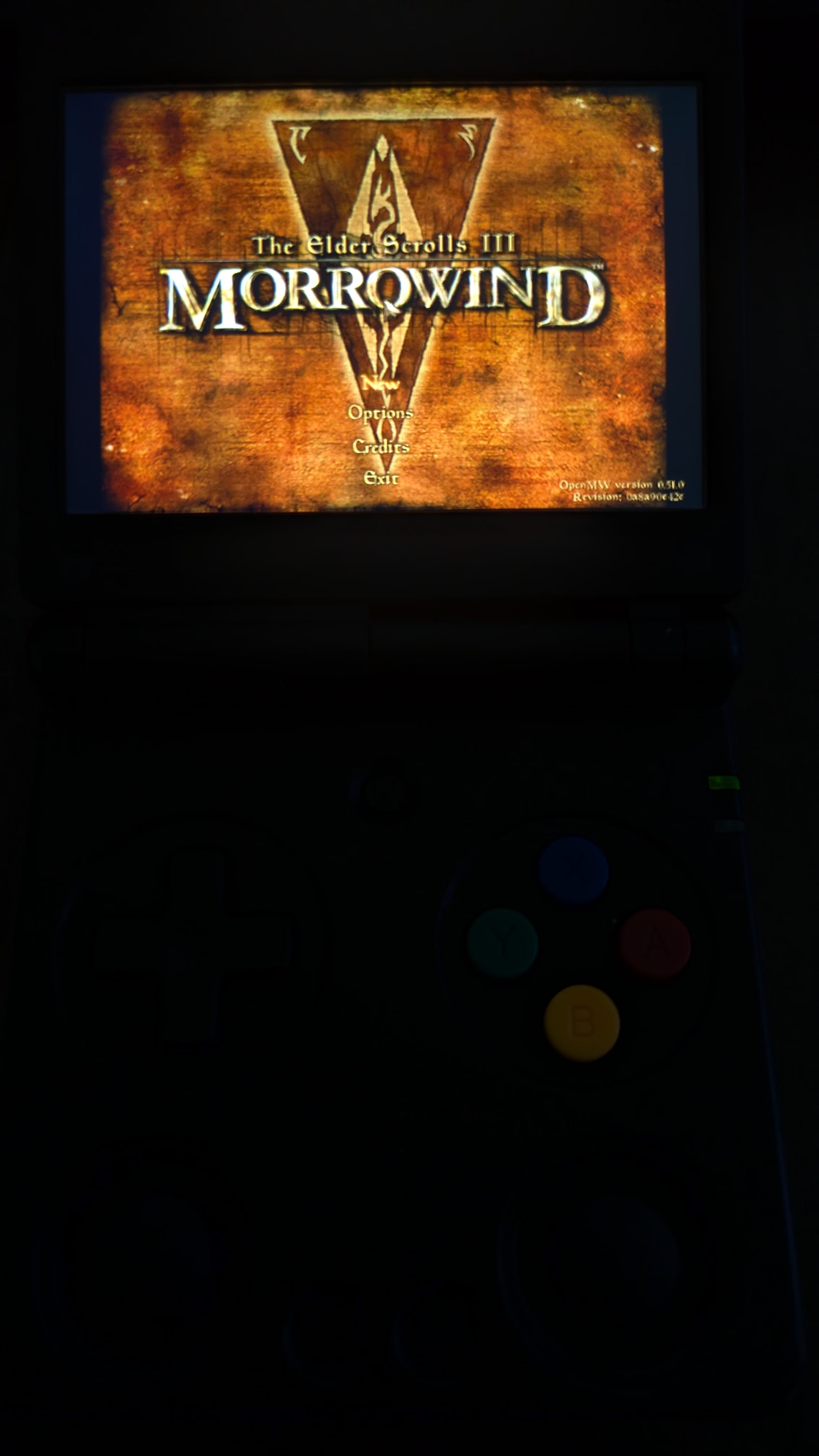
With that, OpenMW launches fine and loads Morrowind perfectly.
Additional Notes
While poking around the system when I was SSHed in, I realized that the mod file extensions .7z and .rar
couldn’t be automatically extracted by portmaster because the utilities didn’t exist on system.
You can repeat the same steps as Problem-1 to install p7zip, p7zip-full, and unrar.
Here are the links for these packages:
- unrar : http://launchpadlibrarian.net/582696373/unrar_6.1.4-1_arm64.deb
- p7zip : http://launchpadlibrarian.net/493615924/p7zip_16.02+dfsg-8_arm64.deb
- p7zip-full : http://launchpadlibrarian.net/493615923/p7zip-full_16.02+dfsg-8_arm64.deb
With this, you shouldn’t have any issue installing/extracting the recommended mods on the OpenMW Portmaster page.
お茶飲みたい〜
Amrit Handa | resume | rss feed | source